Ask for it, in your editor
Every tool on this site, inside the agent you already talk to. Describe the thing and the mesh, the rig, the animation and the files come back where you are working.
Needs an active plan · Pulse, Forge or Crown.
Works in any client that speaks the protocol. Scopes, tokens and ownership are enforced by the API · the server adds no rules of its own.
Pick your client
Three ways in · same tools behind all of them

Codex
Three clicks, with pictures
Add the marketplace
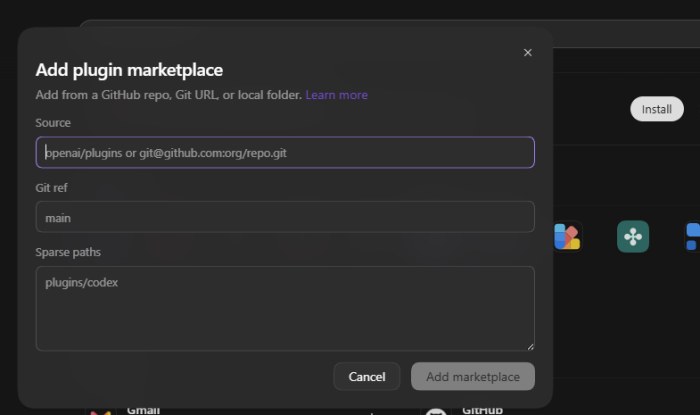
Open Plugins, then Add → Add plugin marketplace. Three fields, and the grey text in them is only an example · leave the third one empty.
- Source
tanerozg/tanerozg-formfromlight-codex- Git ref
main- Sparse paths
- leave empty
It says it cannot find the repository
main. Leave Sparse paths empty, including the grey example
text, which is not a value.
Install, and allow it once
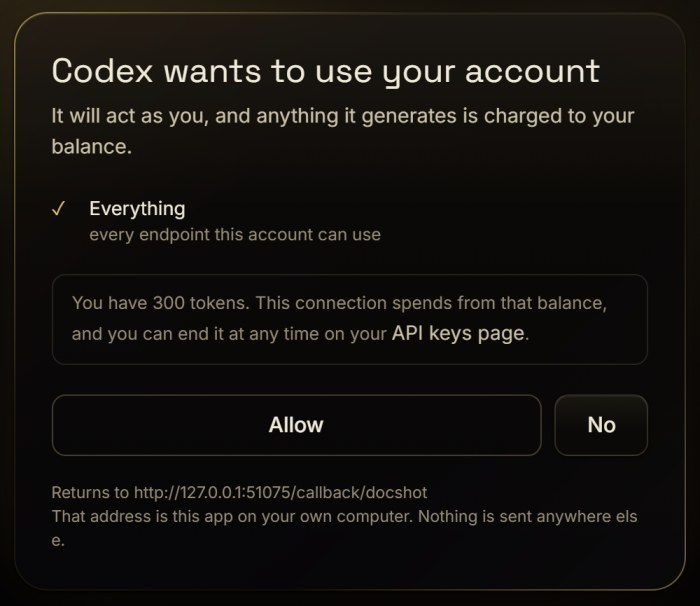
FormFromLight appears in the list. Press Install and your browser opens here. You are shown what the connection may do and what your balance is, and nothing is spent until you press Allow.
There is no key to copy and nothing to paste. The connection appears on your API keys page, where you can end it at any time.
The browser opened and nothing happened
Ask for something
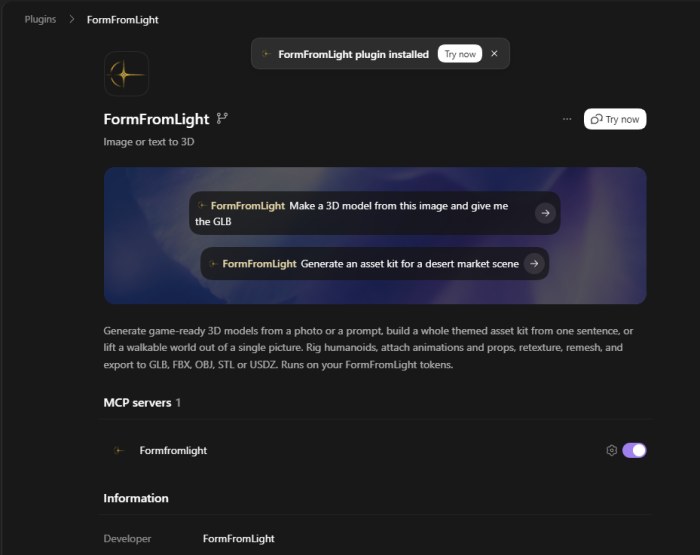
That is the setup. Twenty-two tools are now in reach, and the agent picks the ones it needs.
- Make a 3D model from this image and give me the GLB
- Generate an asset kit for a desert market scene
- Rig this character and animate it walking
A run takes one to three minutes; a kit or a world takes longer. What the agent spends comes off your balance, and a failed run is refunded.
What to ask for
Ordinary sentences · the agent picks the tools
Claude
One command, or one field
Two commands. The first adds it, the second signs you in.
claude mcp add --transport http --scope user formfromlight https://formfromlight.com/mcpIt answers needs authentication. That is the expected reply, not a failure · it is waiting for you to approve it.
claude mcp login formfromlightYour browser opens, you approve it once, and the tools are there next time the client starts. No key to issue, nothing to install.
Run that second one in a terminal window of your own. It waits on a port for your browser to come back, and it needs a real console to do that · asked from inside an agent it stops at stdin isn't a terminal.
--scope user puts it in every project. Without it the server belongs
to whichever folder you ran the command in, and it is missing everywhere else.
Open Settings → Connectors, choose Add custom connector, and paste this address. Leave the client ID and secret empty · the server hands those out itself.
https://formfromlight.com/mcpYour browser asks you to approve it once, and that is it.
On a Team or Enterprise plan an owner adds it under organisation settings first · everyone else connects from their own Connectors panel afterwards.
If something goes wrong
What it says, and what it means
| What you see | What it means |
|---|---|
| The plugin is not in the list | You are in a chat window rather than Codex. The plugin only loads there. |
claude mcp add says needs authentication |
The expected answer, not a failure. Run claude mcp login formfromlight and approve it in the browser. |
| “stdin isn't a terminal” | The sign-in was asked for somewhere without a console. Run claude mcp login formfromlight in a terminal window you opened yourself. |
| The authorisation link from that message does not work | It belongs to a challenge and a listening port that both ended with the command. Run the command again rather than reusing the link. |
| The server is missing in another folder | It was added to one project. Remove it there, add it again with --scope user, and it follows you everywhere. |
/mcp only prints a one-line summary |
That is what it does outside an interactive terminal. claude mcp login works anywhere and needs no menu. |
| Signed in, but the tools are not there | Servers load when the client starts. Restart it once and they appear. |
| It asks you to paste an API key | It does not need one. Say so · the connection signs in through your browser. |
| “Not enough tokens” | Nothing was generated and nothing was charged. Top up, then ask again. |
| “stumbled before it started” | The trouble was on our side, not with your picture. Your tokens are back · ask again in a minute. |
| “content checker refused this image” | The picture was refused before anything was made. Tokens back · a different picture will go through. |
| It says an engine is invalid | There are two: the everyday one and the quick one. Ask for one of those, or say nothing and get the everyday one. |
| It has been going for minutes | That is the normal length of a run. A kit or a world is longer still · it keeps going if you look away. |
| A local file path does not work | The server fetches a picture by address, so it needs one it can reach. Put the image somewhere public first. |
Paste this into any client that speaks MCP over HTTP. Your browser opens, you approve it once, and that is the whole setup · there is no key to copy and nothing to install.
https://formfromlight.com/mcpPlease configure the FormFromLight MCP server in the client I am using:
server name formfromlight, Streamable HTTP URL https://formfromlight.com/mcp,
with OAuth. Use this client's configuration method, keep my other
settings, and reuse any existing entry. Walk me through the browser
authorization, then verify the connection and list the tools.
Some clients still want a command to run. Issue a key on
your API keys page and
use this instead. Give it *, or only the scopes the agent may spend ·
generate:text and models:read alone are useful and cannot
spend much.
{
  "mcpServers": {
    "formfromlight": {
      "command": "npx",
      "args": ["-y", "formfromlight-mcp"],
      "env": { "FFL_API_KEY": "ffl_your_key_here" }
    }
  }
}claude_desktop_config.json. Cursor: .cursor/mcp.json. Same tools either way.
Tools
What the agent can do, and what each costs
| Tool | Tokens | What it does |
|---|---|---|
whoami |
0 | Account, balance and plan behind the key |
generate_from_text |
2 or 4 | A text prompt becomes a textured mesh · Fast or Studio |
generate_from_image |
2 or 4 | An image URL becomes a mesh · better faces and detail |
list_models · get_model · wait_for_model |
0 | Status and download URLs in every format |
rig_model |
4 | Auto-skeleton for a humanoid |
animate_model |
3 | A motion from a description, baked on a rigged model |
retexture_model · retexture_region |
4 · 1 | A new surface for the whole model, or one part of it |
remesh_model |
3 | Clean quad topology at a chosen face count |
generate_kit · wait_for_kit · get_kit |
4 per model | A whole themed set of models from one prompt |
build_world |
0 | A finished kit laid out as a walkable world |
create_world_from_image · wait_for_world |
7 per object, or 25 for a backdrop | One image becomes a place to stand in |
list_scenes · get_scene · save_scene |
0 | Every placement with a mesh URL and a transform · rebuild it in any engine |
export_scene_package |
0 | The whole scene as FBX, GLB and USD with collision and LODs |
generate_sky |
3 | A 360° panorama from a prompt, set as a scene's sky |
Two pipelines an agent runs
generate_kit
  prompt: "medieval village", count: 16
wait_for_kit
  kit_id: 42
build_world
  kit_id: 42
generate_sky
scene_id: 7, prompt: "overcast dawn"create_world_from_image
image_url: "https://…/forest.jpg"
wait_for_world
scene_id: 9
get_scene
scene_id: 9
export_scene_package
scene_id: 9generate_* returns an id at once and the wait_for_* tools are separate · the agent decides whether to wait, and you can see why it is waiting. Failures come back with the server's own wording: out of tokens, a missing scope, a revoked key.